Is Wayland better than X11
Advantages of Wayland over X11
· 5 min read · 897 words
Introduction #
Wayland and X11 are one of the most prominent display servers. Both of them have their fair share of advantages and disadvantages. While, all the Desktop Environments, Window Managers are switching to Wayland due to it being a better alternative. But what are the differences between these two and why are users and developers switching to Wayland over X11. I’ll try my best to give my opinion on both of these display servers.
What is a Display Server? #
In Linux, A display server is a crucial component that acts as a intermediary between graphical applications and the hardware that is responsible for displaying them. It manages the graphical diplay and user input from input devices like keyboard and mouse.
X11 Display Server #
I’ll first talk about the older display server. The X11 project began in 1987 and has the stable support for almost all the linux native software. X11 follows the client-server protocol where the X server owns all the screens and input devices and all the GUI applications are the clients of the X server. It was specifically designed to work over a network it assumes clients and the server may be on different machines which leads to serialization and backwards-compatibility. It was built with assumptions but most of them no longer holds true. As of today, Linux runs on locally connected displays which is not something that X was designed for. This became increasingly problematic as modern computing kept evolving.
By the early 2000s, X11 was seriously backward technically. Linux ecosystem was evolving which made most of X11’s features really unneccessary. Libraries like libinput started managing fonts which was a priviledge that only X11 had. Cairo and Freetype took over rendering which was earlier done by X11. Yet, X11 was still there with much of unneccessary feature which was seen as a bottleneck.
Architecture #
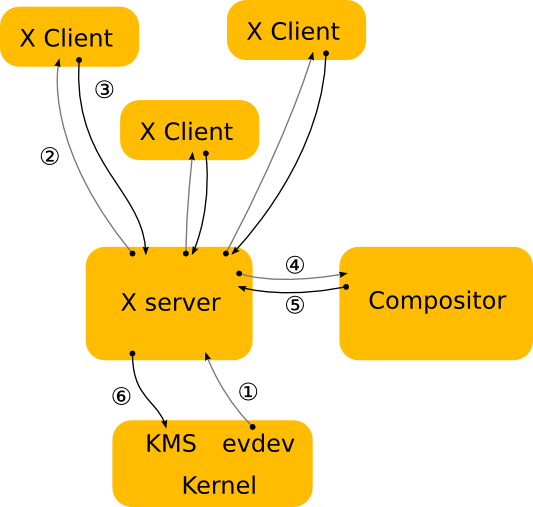
- The kernel gets an event from an input device and sends it to the X server through the evdev input driver and the kernel does all the job from controlling and translating the protocol into the required standard.
- The X server then decides which window the event affects and sends it to that specific client. But X does not know how to do it properly since the windows are controlled by the compositor.
- The client looks at the event and has to decides. The UI has the change when the user controls it. So, the client sends the rendering request to the X server.
- After recieving the request, the X server sends it to the hardware to let it render the UI. Meanwhile, the server calculates the bounding region and sends it to the compositor as a damage event.
- The damage event tells the compositor that something has happened to the screen and it has to recomposite the entire screen with the changes.
Wayland Display Server #
Architecture #
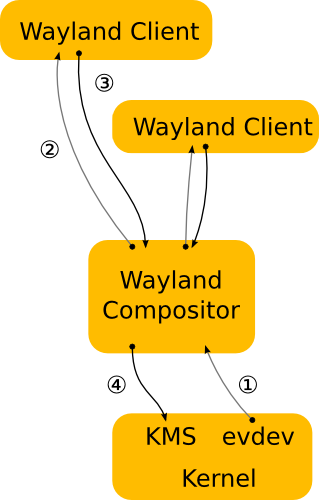
- The kernel gets an event and immediately sends it to the compositor.
- The compositor looks through the scenegraph to see which window get the event.
- As in the X case, when the client receives the event, it updates the UI in response. But in the Wayland case, the rendering happens in the client, and the client just sends a request to the compositor to indicate the region that was updated.
- The compositor collects damage requests from its clients and then recomposites the screen. The compositor can then directly issue an ioctl to schedule a pageflip with KMS.
Wayland is faster than X11 #
In X11, the client talks to the X server -> X server talks to the window manager -> Window Manager to the compositor and finally the GPU. But in Wayland, the client directly interacts with the Compositor then to the GPU. X11 has to go through many steps which makes it slower and bloated when compared to Wayland.
In X11, the application renders to pixmap, and the pixmap is copied to X server and the compositor has to copy again and the GPU finally displays it. But in Wayland, the application directly renders to the GPU buffer and the compositor just has to reference it from the buffer.
Bottom Note #
Both the compositors have both of their pros and cons. X11 is more stable and has a mature codebase and it has a very predictable behaviour. X11 is ideal for screen recording remote desktops and has support for almost every software due to its maturity and a longer existence than Wayland. It is easier to write code for X11 and build low level tools. At the same time, It has many security flaws and broken features. The project is almost dead and many distros have continued to drop X11 as the default display server.
Wayland on the other hand, Wayland is faster than X11 because of the Zero-copy rendering and its more secure since it allows the applications to see only their input and their own surfaces. It has almost perfect frame timing, the compositor controls VSync, frame scheduling and presentation timing which prevents screen tearing. At the same time, its harder to write wayland clients, has weaker remote desktop control when compared to X11 and harder to write low level tools. It is still evolving and many of its protocol extensions are still changing constantly. Many software are yet to extend compatibility to Wayland and iss still growing at a faster rate.